VizStudio vs FitRoom: Which AI Clothes Changer is Better in 2026?
The VizStudio vs FitRoom comparison comes up constantly in e-commerce forums, and for good reason — both promise AI-powered outfit swapping, but the day-to-day experience is remarkably different.
After two months of parallel testing with 50 images spanning casual wear, formal attire, wedding dresses, hats, shoes, and jewelry, the verdict is clear: FitRoom handles the basics competently, but VizStudio is fundamentally more comprehensive.
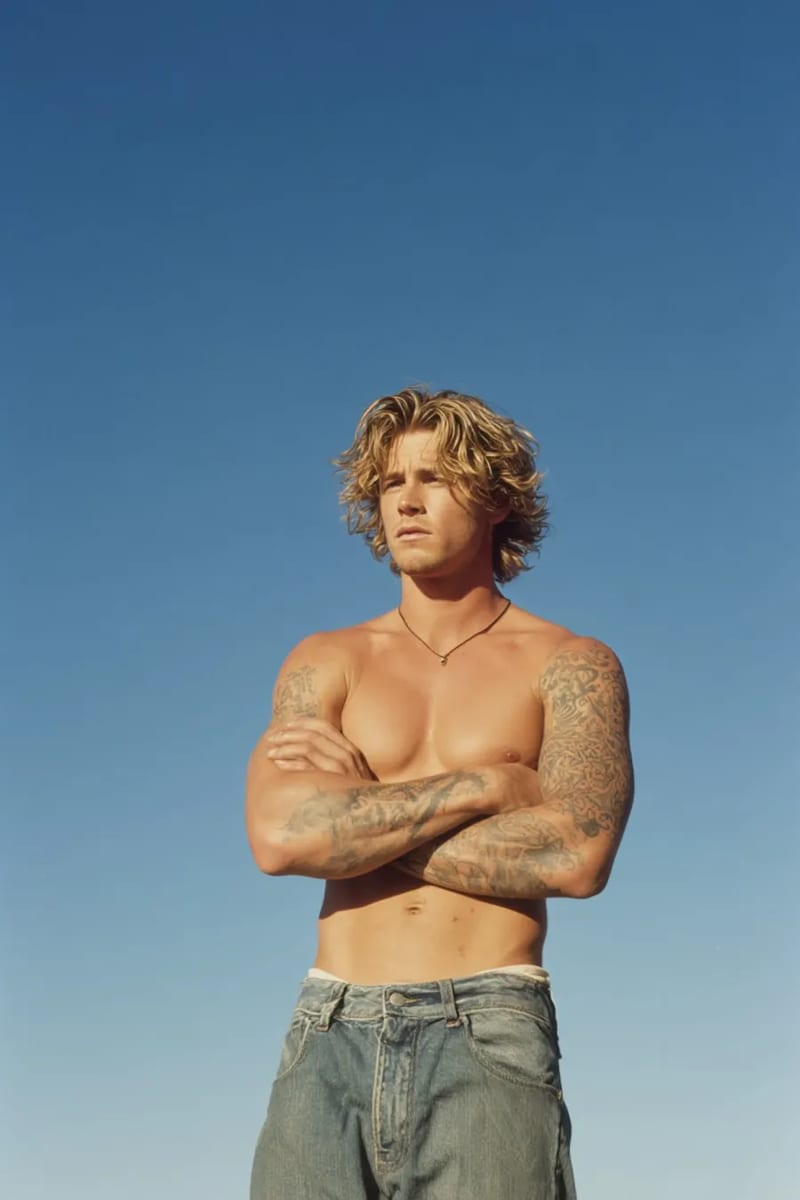
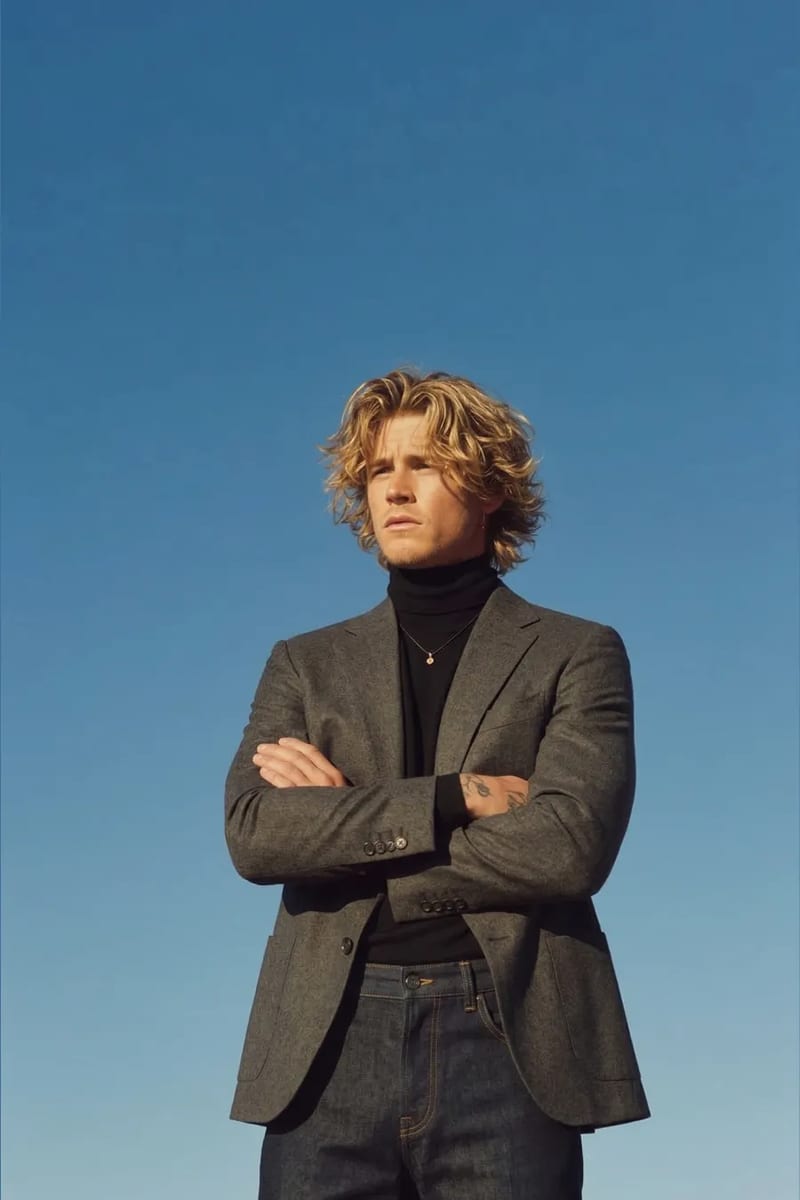
Output Quality: Where the Details Matter
VizStudio’s AI clothes changer consistently produced cleaner edges where garments meet the body — especially around necklines and sleeve openings. VizStudio’s blending was invisible at normal viewing distance, while FitRoom showed visible edge halos on about 30% of test images.
Fabric texture is another differentiator. VizStudio renders the weight of denim, sheen of silk, and texture of knit wool with noticeably more fidelity. FitRoom tends to flatten textures, making everything look like printed cotton — a problem for high-resolution product images where customers zoom in.
Shadow generation showed the most dramatic difference. VizStudio analyzes lighting direction and generates matching shadows on the swapped garment. FitRoom applies generic shadow patterns that sometimes contradict the source lighting, creating a subtle “something is off” feeling.
Try-On Category Range: The Biggest Differentiator
This is where the comparison shifts from quality degrees to fundamental capability gaps. FitRoom swaps tops, bottoms, dresses, and basic outerwear — that’s its entire scope. VizStudio is a full virtual try-on platform:
| Category | VizStudio | FitRoom |
|---|---|---|
| Tops & outerwear | Yes | Yes |
| Dresses & skirts | Yes | Yes |
| Bottoms | Yes | Yes |
| Hats & headwear | Yes | No |
| Shoes & sneakers | Yes | No |
| Rings & jewelry | Yes | No |
| Wedding dresses | Yes | No |
| Color variants | Yes | No |
For basic apparel only, FitRoom’s coverage is sufficient. But if your catalog includes accessories, formal wear, or wedding attire, FitRoom can’t help. VizStudio’s hat try-on correctly adjusts for head shapes and hair styles; the shoe try-on handles footwear perspective well; and the ring try-on manages metallic reflections and gemstone refraction in ways genuinely usable for jewelry listings.
Speed and Processing Performance
For simple garment swaps, both tools process at similar speeds — VizStudio averaged ~8 seconds, FitRoom ~6 seconds. The gap appears with complex garments: VizStudio takes 12-15 seconds on wedding dresses and 10-12 on formal wear because it handles intricate textures, lace, and complex draping. The extra time is worth it — a quick result that looks bad just means regeneration.
Batch processing is available on both platforms, but VizStudio’s quality remained stable across 30-image batches while FitRoom showed slight degradation in the last third.
Workflow Efficiency: One Platform vs. Three
Using FitRoom for clothes swaps means you still need separate tools for background removal and color adjustments — three logins, three billing cycles, and quality degradation from repeated exports. Consolidating into VizStudio’s AI clothes changer, background remover, and image editor cuts per-image processing time by roughly 40% by eliminating export-import overhead.
Supporting Features and Ecosystem
VizStudio bundles complementary features that eliminate the need for additional software:
- AI background remover — handles flyaway hair, transparent fabrics, and fine jewelry details with high accuracy
- AI image editor — color corrections, spot healing, and area-specific adjustments
- AI clothes color changer — swap garment colors (e.g., black to navy) without regenerating from scratch. On FitRoom, each color variant requires a completely separate generation.
Pricing: What You Actually Pay Per Usable Image
Raw pricing is misleading without factoring in failure rates. FitRoom’s usable-output rate was about 75% on complex garments (one in four needs a redo), while VizStudio’s was ~90%. When you include regeneration costs and the supporting tools you’d pay for separately with FitRoom, VizStudio’s effective per-image cost is lower.
| Cost Factor | VizStudio | FitRoom |
|---|---|---|
| Usable output rate | ~90% | ~75% |
| Separate background removal needed | No | Yes (extra cost) |
| Color variant requires regeneration | No (color changer) | Yes (full regeneration) |
| Accessory try-on available | Included | Not available at any price |
Who Should Pick Which?
FitRoom works for basic clothing swaps on casual garments if you already have background removal and editing covered elsewhere. But VizStudio wins as the better AI clothes changer on output quality, category range (accessories and wedding attire FitRoom doesn’t offer), and workflow efficiency. FitRoom’s only edge — a few seconds faster on simple garments — becomes irrelevant when you factor in regeneration time and multi-tool overhead.
Frequently Asked Questions
Can FitRoom handle wedding dress try-on?
No. VizStudio’s dedicated wedding dress try-on handles long trains, delicate lace, and flowing veils — challenges that general-purpose clothes changers aren’t built for. If wedding attire is part of your product line, FitRoom isn’t an option.
Is VizStudio harder to learn than FitRoom?
VizStudio has a slight learning curve due to more features, but it pays for itself within the first session. Ten minutes of familiarization, then workflow efficiency gains from having everything in one place.
Which tool is better for small businesses just starting with AI product photos?
VizStudio, because it scales with your needs. Starting with FitRoom means eventually hitting its capability ceiling and facing a migration. VizStudio lets you begin with simple clothes swapping and expand into accessories, color variants, and editing tools as your catalog grows.
How do both tools handle patterned or textured fabrics?
Both handle solid colors and simple patterns well. The gap appears on complex textures — plaids, embroidery, sheer fabrics. VizStudio preserves detail more faithfully while FitRoom tends to simplify or blur complex patterns.
The Verdict
After two months of parallel testing, VizStudio wins on quality, category range, integrated tools, and effective cost per usable image. Try both with your own product photos — but based on everything measured, most users will reach the same conclusion.
KI-Video- & Bildgenerierungs-Suite
Videoeffekte, virtuelles Anprobieren, Kleidungswechsler, Fotostudio, Hintergrundentferner und mehr — angetrieben von den neuesten KI-Modellen.
KI-Kuss-Video
Verwandle Fotos zweier Personen in romantische KI-animierte Kuss-Videos mit realistischen Gesichtsausdrücken und Bewegungen.
KI-Küsse-Video
Lade ein Selfie hoch und KI generiert ein lustiges Video, bei dem attraktive Personen von beiden Seiten einstürmen, um dich zu küssen.
KI-Umarmungs-Video
Verwandle Fotos in herzerwärmende KI-Umarmungs-Videos mit natürlicher Umarmungsanimation und emotionalen Ausdrücken.
KI-Bikini-Generator
Generiere ein Video mit einem flüssigen, natürlichen Kleidungsübergang in stilvolle Bikini- oder Bademode-Outfits.
KI-Muskel-Generator
Erstelle dramatische Muskelwachstum-Transformationsvideos aus deinen Fotos mit realistischer Körperanimation.
KI-Tanz-Video
Animiere Personen beim Tanzen mit energiereicher Choreografie, fließenden Körperbewegungen und rhythmischer Bewegung.
Ghibli-KI-Video
Verwandle Fotos in magische Studio-Ghibli-Animationen mit weichen Aquarell-Texturen und fantasievoller Bewegung.
KI-GIF-Generator
Erstelle nahtlose Loop-animierte GIFs aus statischen Bildern — perfekt für Social Media und Nachrichten.
KI-Hanfu-Transformation
Verwandle Fotos in beeindruckende traditionelle chinesische Hanfu-Kleidungsvideos mit eleganten Seidengewändern und aufwendiger Stickerei.
KI-Kleidungswechsler-Video
Erstelle nahtlose Outfit-Transformationsvideos — KI durchläuft 5–6 stilvolle Outfits und bewahrt dabei deine Identität.